AI project management means using AI models for the routine parts of running a project, so people spend their time on decisions instead of admin. It is useful, but narrower than the marketing suggests. This page explains what it can do today, what it cannot, and how to set it up inside WordPress with a kanban board and your own API key.
What AI project management software can do
Most AI project management software, whether it is a hosted suite or a plugin, does a handful of jobs well:
- Turn messy input into tasks. Paste meeting notes or an email thread and get a task list with titles, priorities and due dates.
- Break big tasks into steps. One vague card becomes a set of subtasks you can assign.
- Summarize progress. A daily standup or weekly report written from the board’s real data.
- Draft updates for clients and stakeholders. A first version you edit, based only on what is on the board.
- Triage and routine edits. Agents can create, move and comment on tasks when told to.
It does not replace planning judgment. Models can miss context, so a person should review what the AI creates before the team relies on it.
AI project management tool: what to compare
When you evaluate an AI project management tool, check these five things before you look at the feature list:
- Where AI is included. Some vendors bundle it into a paid tier, others sell it as a separate add-on.
- How usage is metered. Credits and token limits decide what a busy team really pays.
- Where your data goes. Find out which model provider receives your task text.
- Whether the AI can act, not just write. Agent access through a standard such as MCP lets AI do work on your boards.
- What a team seat costs at your size. Per-seat pricing adds up quickly for agencies and large editorial teams.
Our best AI project management tools in 2027 roundup applies this checklist to the main options. If you mostly want a smart to-do list, read best AI task managers in 2027.
How KanbanWP handles AI
KanbanWP is a free WordPress plugin with kanban boards, and its AI follows a simple rule: you bring the key.
- Your own key. Connect OpenAI, Anthropic, Google Gemini or any OpenAI-compatible service. The key stays on your site. See providers and keys.
- Ten AI features. Text to tasks, task breakdown, task summary, post outline, post draft, post SEO, daily and weekly board summaries, generate board, client updates and a command feature. The AI guide lists them all.
- Cost controls. A monthly token cap per user, role-based access, and a usage log. See usage and limits.
- MCP for agents. An MCP server lets agents such as Claude, Cursor or Codex list boards, create and move tasks and add comments, with every call logged. See MCP.
One honest limit: in version 1.0.0 the AI features are called through the REST API, so someone technical wires them into a script or tool. The board screen does not have AI buttons yet.
AI sprint planning
Teams searching for AI sprint planning usually want to go from a pile of requests to a sized, ordered list of work. KanbanWP is a kanban tool, so it has no sprint object, but the planning steps still work:
- Paste the requests into text to tasks to get draft cards.
- Run task breakdown on anything large.
- Order the cards by priority and due date, and set a WIP limit on the In Progress stage so the sprint stays finishable.
- Use the weekly board summary as the sprint review input.
For a setup to copy, see kanban for project management.
AI kanban board
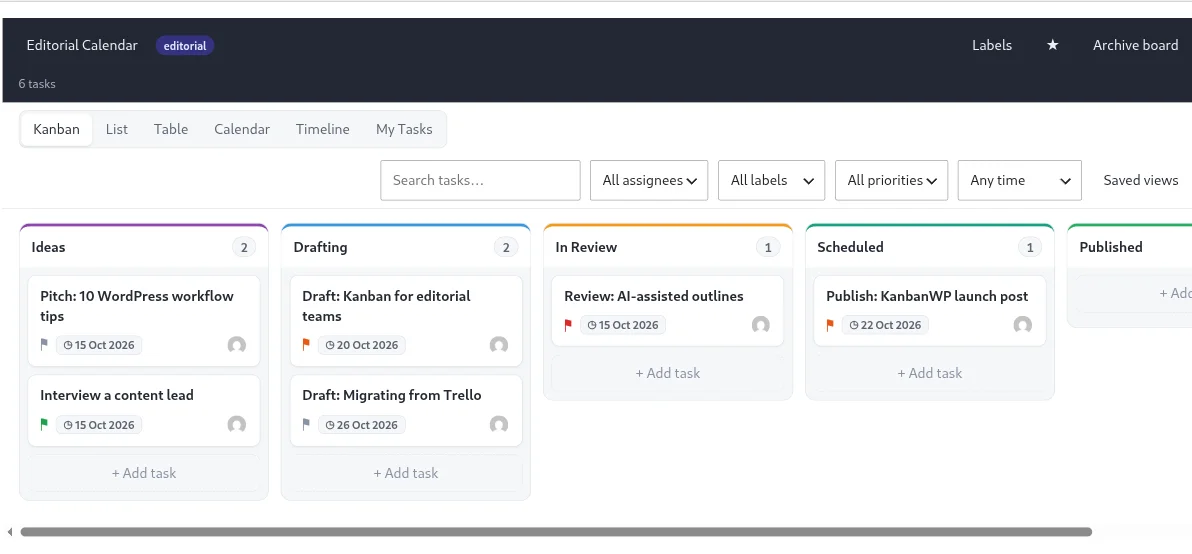
An AI kanban board is a normal board with AI helping at the edges: generating the board from a description, filling it from notes, and writing the summary at the end of the week. KanbanWP’s generate board feature designs stages and starter tasks from a short brief, and the five board templates give you a ready start when you would rather not use AI at all.
New to the method? Read why kanban works first.
WordPress project management
Most project tools live outside your site, with a separate login and a monthly bill per user. If your team already works in WordPress, a board in the admin removes that friction, keeps data in your own database and lets cards link to posts and pages. It also supports a client portal for sharing progress.
Compare it with the alternatives in best Trello alternatives in 2027, best free kanban board software in 2027 and the direct KanbanWP vs Trello page.
Start in ten minutes
- Download KanbanWP and follow the installation guide.
- Create a board from a template.
- Add an AI provider key under KanbanWP > Settings > AI.
- Set a monthly token cap, then try one feature on a real project.
See everything the plugin does on the features page.
Guides in this series
- Best AI project management tools in 2027
- Best AI task managers in 2027
- Best Trello alternatives in 2027
- Best free kanban board software in 2027
- Kanban board templates
- KanbanWP vs Trello
- Client portal for WordPress
Frequently asked questions
What is AI project management?
It is using AI models to handle the routine parts of managing projects: turning notes into tasks, splitting big tasks into steps, summarizing progress and drafting status updates. People still decide priorities and make the calls.
What is the best AI project management tool?
It depends on your team. Hosted suites such as Asana, ClickUp and monday.com bundle AI into per-seat plans. If your work already runs on WordPress, KanbanWP adds kanban boards plus AI on your own API key at no license cost. Our comparison covers the options.
Does KanbanWP have an AI project management tool built in?
Yes, with limits. Version 1.0.0 includes AI features for text to tasks, task breakdown, summaries and board reports, reached through the REST API, plus an MCP server for outside agents. The board screen has no AI buttons yet.
Do I need to pay for AI separately?
You pay your AI provider directly for the tokens you use. KanbanWP is free and adds no markup. Per-user monthly token caps and a usage log help you control the bill.
Is it safe to send project data to an AI model?
The task or board text you run through a feature is sent to the provider you configured, so check that provider's terms first. If you add no API key, KanbanWP never makes an AI request.