KanbanWP runs inside your WordPress admin and stores everything in your own database. This page lists what is in the plugin today. Each group links to the documentation for the details. New here? Start with AI project management or the five board templates.
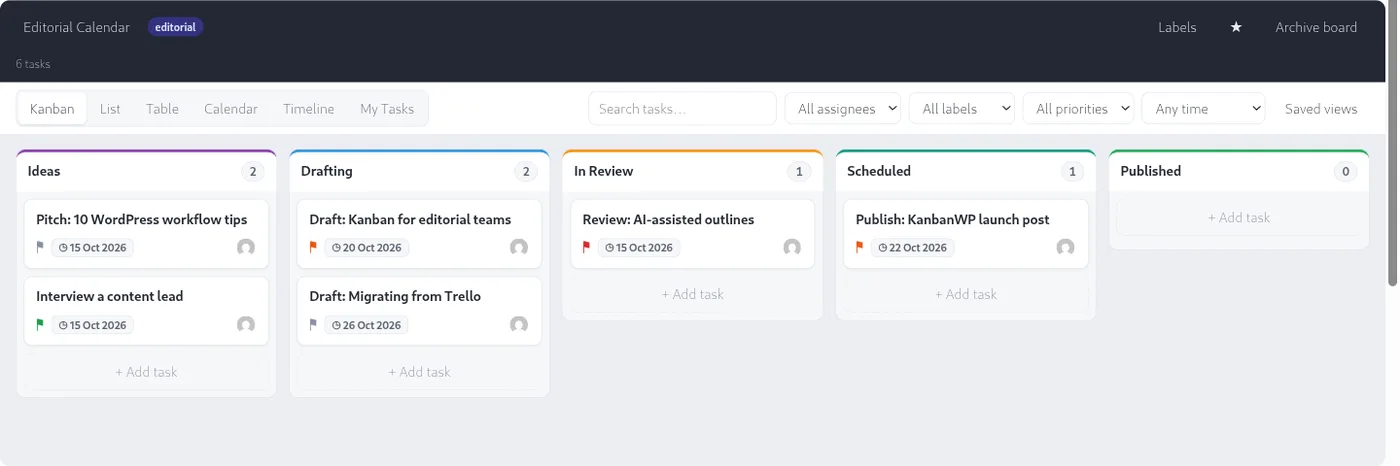
Boards and stages
- Unlimited boards. Create as many as you need.
- Board templates. Start from Editorial, Client, Sales, Bugs or Blank. Each template creates a ready set of stages and labels.
- Drag-and-drop stages. Add, rename, color and reorder stages.
- WIP limits. Set a work-in-progress limit per stage. The stage counter shows
count/limitand flags the stage when it goes over. You can also set a default limit for new stages. - Swimlanes. Group cards into horizontal lanes inside each stage.
- Folders and favorites. Organize boards into folders and star the ones you use most.
- Archive and duplicate. Archive boards you are done with, or copy a board as a starting point.
- Embedding. Show a board on a page with the
[kanbanwp_board]shortcode or the KanbanWP block.
Docs: Boards, Templates, WIP limits, Swimlanes.
Tasks
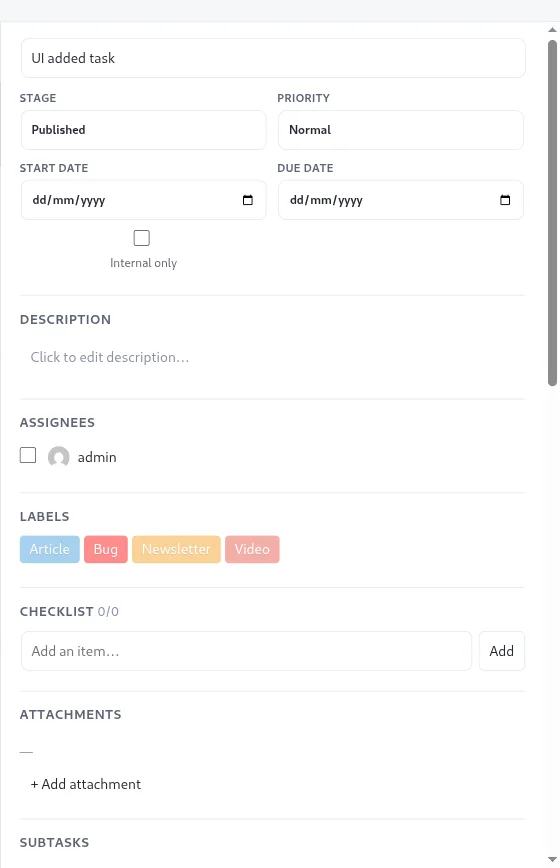
- Title, rich description, priority (low, normal, high, urgent), start and due dates, and multiple assignees.
- Labels, checklists, file attachments and a cover image.
- Custom fields for the extra details your process needs.
- Subtasks and dependencies between tasks.
- Internal tasks that clients cannot see.
- Search and filter by stage, assignee, label, priority and due date.
Docs: Managing tasks, Subtasks and dependencies, Custom fields.
Views
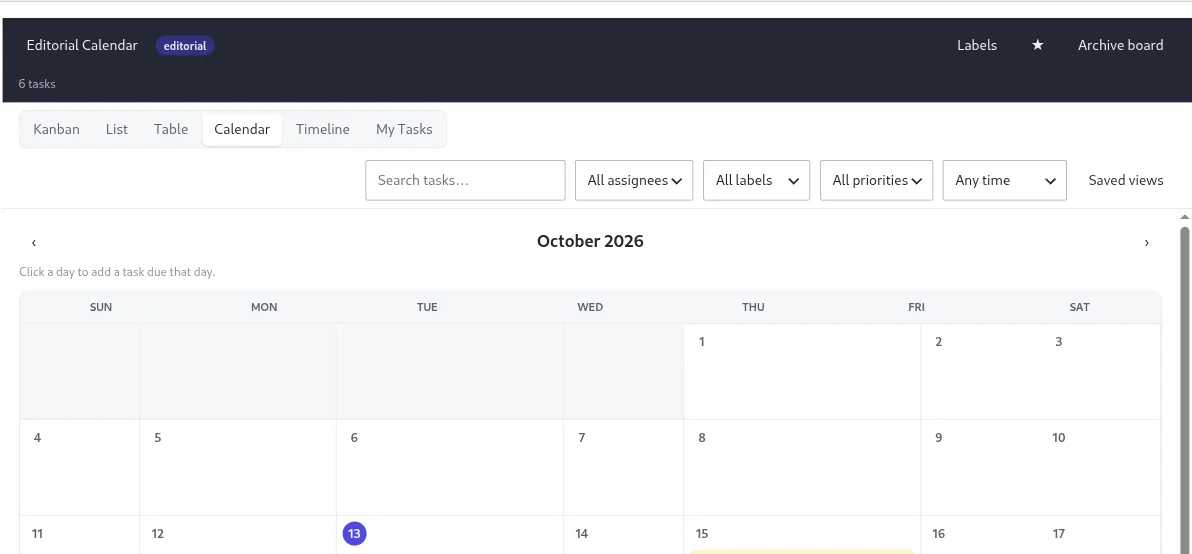
Every board can be shown six ways, and you can save the combinations you use often as saved views.
| View | Good for |
|---|---|
| Kanban | Moving work through stages |
| List | Scanning many tasks quickly |
| Table | Comparing fields side by side |
| Calendar | Seeing due dates by day |
| Timeline | Seeing tasks laid out over time |
| My Tasks | Tasks assigned to you on this board |
Docs: Views, Saved views.
Collaboration and roles
- Board roles: admin, member, viewer and client. Admins can manage the board, members can edit, viewers can only look, and clients can view and comment.
- Comments with @mentions. Comments can be marked internal so clients do not see them.
- Notifications. In-app notifications, optional email notifications, and daily or weekly email digests. You choose whether to be notified on assignment, mentions and new comments.
- Slack and Discord. Send board activity to a channel through an incoming webhook URL.
- Activity feed on every board.
- Reports. Overview totals, workload per member, a cumulative flow chart and average cycle time, with CSV export.
Docs: Permissions and roles, Comments, Notifications, Reports.
Client portal
Give clients a view of the work without giving them your admin.
- Assign the client role to a user on a board. They see non-internal tasks and comments only, and can comment.
- Embed a board on a front-end page for logged-in members.
- Optionally turn on public links: a read-only snapshot of a board, reached through a secret token you can revoke. Public snapshots leave out internal tasks and comments, and show display names, never emails.
Guide: client portal for WordPress.
Docs: Client portal, Public links.
AI on your own key
- Connect OpenAI, Anthropic, Google Gemini, or any OpenAI-compatible API such as OpenRouter.
- Your key is stored on your site and used only from your server.
- AI features available through the REST API: turn pasted notes into tasks, break a task into subtasks, summarize a task, outline or draft a post, suggest SEO title and meta description, generate a whole board from a description, write daily or weekly board summaries, and draft friendly or professional client updates.
- Prompt preferences. Add your own tone and style notes globally or per feature.
- Controls. Set a monthly token cap per user and choose which roles can use AI. Every call is logged on a usage screen.
In version 1.0.0 the AI features are called through the REST API, so you or a developer wire them into your own scripts or tools. The board screen does not have AI buttons yet. KanbanWP adds no markup and has no payment gateway. You pay your provider directly.
Guides: AI project management, best AI task managers in 2027, best AI project management tools in 2027.
Docs: AI, Providers and keys, Usage and limits.
MCP for agents
KanbanWP includes an MCP server so tools such as Claude, Cursor and Codex can work with your boards over HTTP.
- Seven tools: list boards, get a board, list tasks, create a task, update a task, move a task and add a comment.
- Bearer token authentication, off until you enable it.
- Every call is written to the activity log with the agent’s name.
- No delete tool. Destructive actions stay in wp-admin and WP-CLI.
Docs: MCP, Connecting an agent.
Automation and integrations
- Outgoing webhooks for task created, updated, moved and deleted, comment added and board created. Deliveries are signed with HMAC SHA-256.
- WordPress posts. Link a task to a post or page, create a draft from a task, and optionally sync stage with post status in both directions. A block editor sidebar shows the linked task.
- WooCommerce. New orders and newly published products can create tasks on a board you choose.
- Forms. Any form plugin can create a task by firing the
kanbanwp_form_submissionaction. - REST API and WP-CLI for boards, tasks, import, export and AI usage.
- Hooks and filters for developers.
- Slack and Discord notifications.
Docs: Integrations, Webhooks, REST API, WP-CLI.
Import and export
- Import from Trello JSON exports: lists become stages, and cards, labels, checklists, members and comments come across.
- Import CSV with title, description, stage, priority, assignee, dates, labels and swimlane columns.
- Import KanbanWP JSON to restore or clone a board.
- Import leftover data from the previous plugin, best effort, when its tables are still in your database.
- Export a single board as JSON, all data as JSON, or report data as CSV.
Docs: Importing from Trello, Importing from the previous plugin.
Privacy
- Boards, tasks, comments and settings live in tables in your WordPress database.
- The plugin has no account system, no license check and no telemetry.
- It contacts outside services only when you set them up: your AI provider, Slack or Discord, and webhook URLs you add.
- A setting lets you remove all plugin data when you uninstall.
Read the privacy policy. Ready to try it? Download KanbanWP.