A kanban board template saves you from designing stages on day one. KanbanWP ships five. Each one creates a board with colored stages and a starter set of labels, and you can change everything afterward. New to the method? Read why kanban works first.
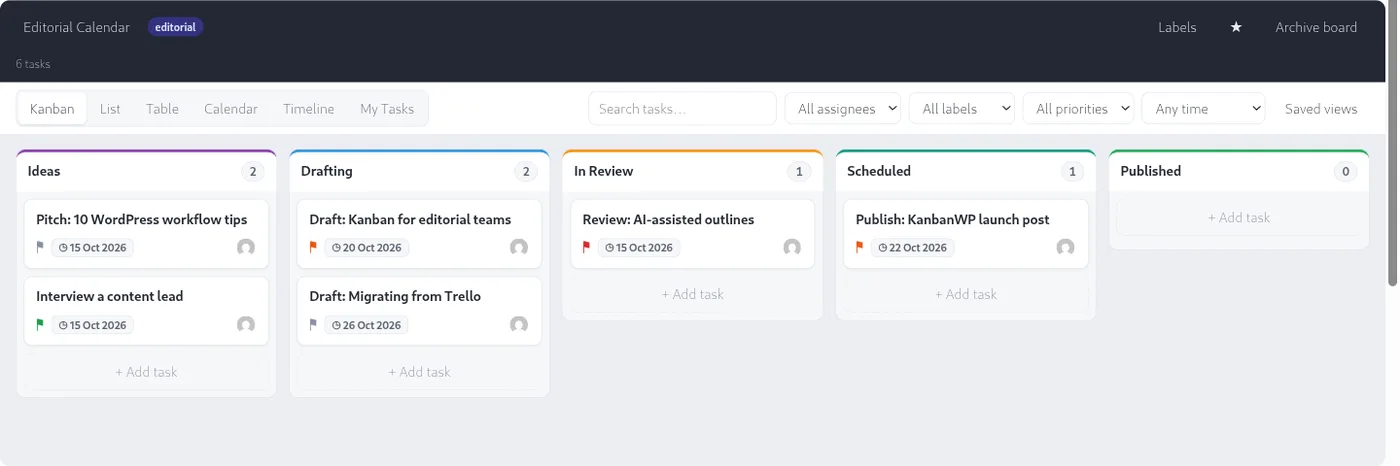
Editorial kanban board template
For planning and publishing content.
- Stages: Ideas, Drafting, In Review, Scheduled, Published
- Labels: Article, Video, Newsletter
Cards can link to WordPress posts and pages. See the full editorial calendar setup.
Client work kanban board template
For work that a client reviews and approves.
- Stages: Backlog, In Progress, In Review, Approved, Done
- Labels: Feedback, Revision, Approved
Share progress through the client portal.
Sales pipeline kanban board template
For tracking leads and deals.
- Stages: Lead, Contacted, Proposal, Negotiation, Won, Lost
- Labels: Hot, Warm, Cold
Forms and WooCommerce orders can create cards automatically. See the sales pipeline guide.
Bug tracking kanban board template
For triage and fixing issues.
- Stages: New, Triaged, In Progress, In QA, Resolved
- Labels: Critical, Minor, Enhancement
Blank kanban board template
A minimal start for anything else.
- Stages: To Do, Doing, Done
- Labels: High Priority, Low Priority
For general team work, extend it as shown in kanban for project management.
How to use a template
- Install KanbanWP.
- Go to KanbanWP > Boards and choose Create a board.
- Pick a template in the Template dropdown.
Step by step: your first board and the templates reference.
After you start
- Set a WIP limit on your busiest stage. See WIP limits.
- Add custom fields for details your process needs: custom fields.
- Speed up setup with AI: the generate board feature can design a board from a short description. See AI project management.
- Looking for other tools with templates? Compare options in best free kanban board software in 2027.
Download KanbanWP and create your first board in a few minutes.
Frequently asked questions
What is a kanban board template?
A kanban board template is a pre-built set of stages and labels for a type of work, so you can start tracking immediately instead of designing a board from scratch.
Are the KanbanWP kanban board templates free?
Yes. They are part of the free plugin, with no license key. Pick one in the Template dropdown when you create a board.
Can I change a template after I create a board?
Yes. Stages and labels are stored per board, so you can rename, add, recolor or reorder them without affecting other boards.
Can I make my own template?
Set up a board the way you like and duplicate it. A duplicate copies the stages exactly, which makes a handy reusable template.