KanbanWP is a free WordPress plugin that puts kanban boards inside your admin area. You create a board, split it into stages, add tasks, and move them across as work progresses. Everything is stored in your own WordPress database, so there is no separate account, no per-seat fee and no third-party service holding your task list.
This post is a short tour: what the plugin does, who it is for, and one note about where it came from.
What it does
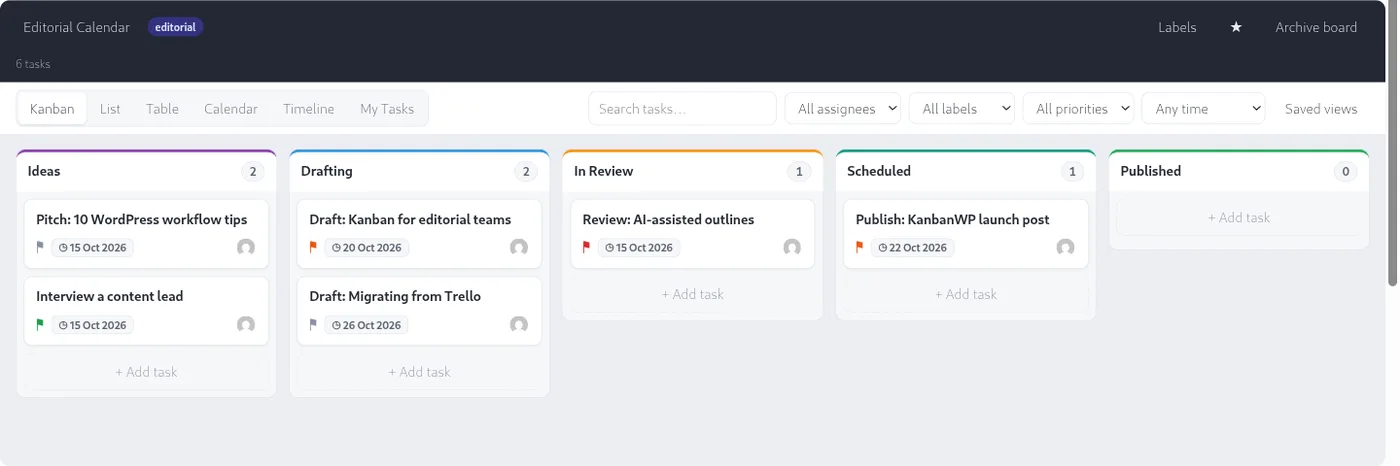
A board is a set of stages, such as Ideas, Drafting, In Review and Published. Each task is a card that sits in one stage. You drag the card forward when its status changes. That is the whole idea, and it is why kanban is easy to adopt: anyone can look at the board and see what is happening.
On top of that, KanbanWP adds the details most teams eventually need:
- Priorities, due dates, assignees and labels on every task.
- Checklists, attachments, subtasks and dependencies.
- Work in progress limits on stages, so a column cannot quietly fill up.
- Swimlanes and saved views to slice a busy board.
- Five board templates: Editorial, Client, Sales, Bugs and Blank.
- Comments with @mentions, plus internal-only tasks and comments.
If you want the details, the documentation walks through each area, starting with understanding the kanban board.
Who it is for
KanbanWP fits people who already work in WordPress and would rather not add another login:
- Editorial teams who want to track posts from idea to published. Cards can link to WordPress posts and pages.
- Freelancers and agencies who need to show clients progress without handing over admin access. A client role sees only what you share.
- Small teams running a sales pipeline, a bug list or a content calendar.
- Site owners who simply want a better to-do list than a notes file.
It is not trying to replace a heavyweight tool built for hundreds of engineers. If you need portfolio planning across a large organization, you will probably outgrow it. For the rest of us, a clear board is usually enough.
A few things that set it apart
You can bring your own AI key (OpenAI, Anthropic or Google Gemini) for features such as turning pasted notes into tasks. Nothing is bundled, and you pay your provider directly. An MCP server lets AI agents read and update boards with a token you control. There is also a REST API, WP-CLI commands and outgoing webhooks for the people who like to automate. We cover those in later posts.
A note on ownership
KanbanWP is a new plugin under new ownership. It is not a continuation of the older “Kanban for WordPress” plugin that was closed on WordPress.org in 2024, and it shares none of that plugin’s code. If you used the old one, you may find the name familiar, but you should treat this as a fresh start. You can read more about who we are on the About us page.
Getting started
Installation takes a couple of minutes: upload the plugin or install it from the Plugins screen, activate it, and open KanbanWP in the admin menu. The installation guide and your first board cover the rest. Pick a template, rename the stages to match how you actually work, and add three real tasks. That is enough to know whether it suits you.
Choosing between tools? Read best Trello alternatives in 2027 and best AI project management tools in 2027.