A task is a card on a board. It sits in one stage, and you move it from stage to stage as the work progresses. Every task belongs to exactly one board.
What a task can hold
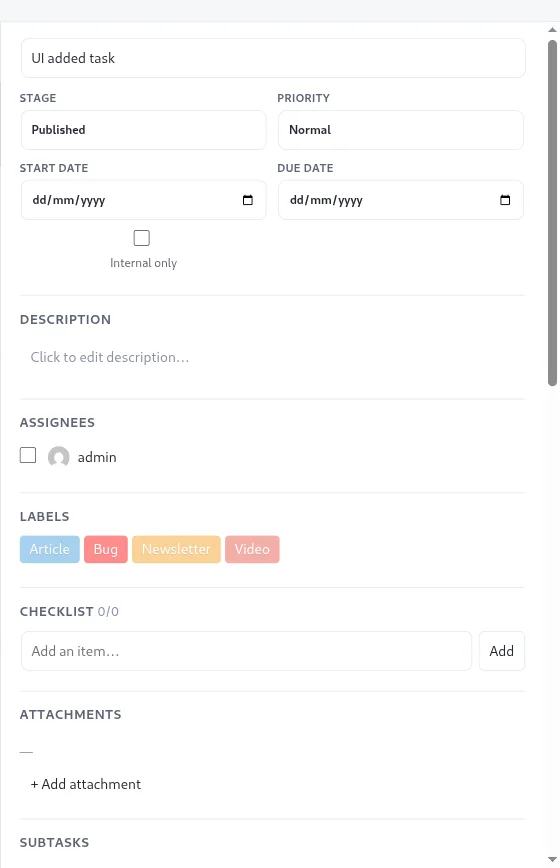
Each task has a title and can also carry:
- A stage, a priority (low, normal, high or urgent), a start date and a due date.
- A description, assignees and labels.
- A checklist and file attachments.
- Subtasks and a “Blocked by” list of other tasks.
- Custom fields, which are free-form name and value pairs.
- A recurring schedule (daily, weekly or monthly).
- Comments, an activity history and an optional link to a WordPress post.
- An internal-only flag that hides the task from clients and viewers.
Guides in this section
- Managing tasks: create, move and open tasks.
- Updating tasks: every field in the detail panel.
- Deleting a task: archive versus delete.
- Filtering tasks and searching for tasks: find what you need on a busy board.
- Subtasks and dependencies: break work down and note what blocks what.
- Checklists and attachments: small steps and files.
- Recurring tasks: repeat work on a schedule.
- Custom fields: store extra details on a card.
- Best practices: habits that keep a board useful.
Who can do what
Your board role decides what you can do with tasks. Admins and members can create and edit them. Viewers and clients can see tasks, and clients can comment. See permissions and roles for the full table.